For a laptop that rarely leaves your desk, the Rain Design mStand gives fixed, simple elevation. The Twelve South Curve Flex adjusts height and angle and folds to 1.18 inches for travel. The Roost V3 offers seven height settings at a listed 178 g. Whichever you pick, plan on an external keyboard and mouse.
If your laptop lives on one desk most of the week, start with the Rain Design mStand. It is a single piece of aluminum at a fixed listed height of 5.9 inches, with a rear cable opening and nothing to adjust. If you split time between a desk and a bag, look at the Twelve South Curve Flex. It adjusts up to a maximum unfolded height of 10.78 inches and folds to 1.18 inches. If carry weight matters most, the Roost V3 is listed at 178 g, folds to 1 by 1.5 by 13 inches and offers seven height settings.
These are recommendations based on manufacturer specifications, not measured rankings. We have not tested these stands for stability, cooling or durability. This guide focuses on what the published numbers tell you and the checks you should make against your own laptop and desk.
Quick picks
| Product | Best for | Documented strength | Check before buying |
|---|---|---|---|
| Rain Design mStand | A permanent desk setup | Single-piece aluminum; 5.9 in tall, 10 in wide, 7.5 in deep; rear cable opening | Height is fixed. The standard mStand has no swivel base; the mStand360 is a separate model. |
| Twelve South Curve Flex | Adjustable height at home and on the road | Up to 10.78 in maximum unfolded height; 0 to 45 degree keyboard angle; folds to 1.18 in; travel sleeve and hinge tool included | Laptop must be at least 8.66 in wide and no more than 7 lb. |
| Roost V3 | Low carry weight with a height range | Listed at 178 g; seven height settings; published screen lift of 6.5 to 12.5 in; folds to 1 x 1.5 x 13 in | Confirm fit for unusual chassis shapes. The V3 Plus is a different variant with different specs. |
Fixed or folding: decide this first
Most laptop stand decisions come down to one question: will the stand move with the laptop, or stay on the desk?
A fixed stand like the mStand has no hinges, knobs or height settings. You set the laptop on it and the height is whatever the stand is. The upside is simplicity, because there is nothing to loosen or readjust. The downside is that if 5.9 inches does not suit your chair, desk and monitor arrangement, you cannot change it on the stand itself.
A folding stand like the Curve Flex or Roost V3 trades some of that simplicity for adjustability and packability. You choose a height, and you can collapse the stand into a bag. The cost is moving parts, setup time each session, and a design built around being portable rather than staying put.
A useful rule: if you can picture the stand sitting in the same spot for months, a fixed stand is the cleaner choice. If you can picture it in a backpack within the next week, start with the folding options.
Rain Design mStand: best for a permanent desk
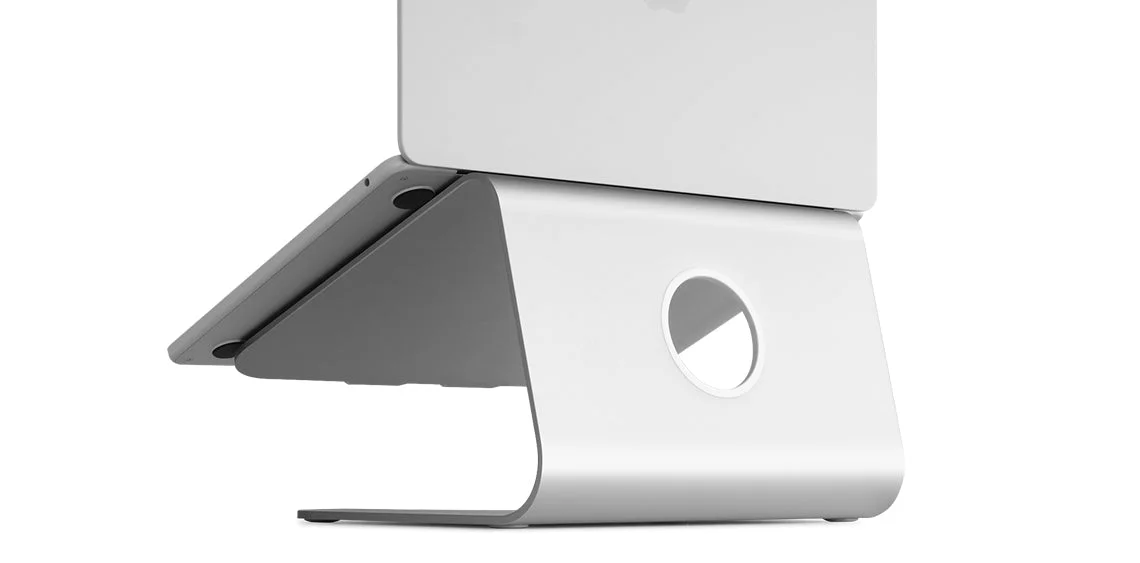
The mStand is made from a single piece of aluminum. Rain Design lists it at 5.9 inches high, 10 inches wide and 7.5 inches deep. A cable opening at the back can help route a charging cable or USB-C hub cable behind the laptop rather than across the desk.
Why choose it: it is the most straightforward option here. There are no height settings, no hinges and no folding. If your laptop is effectively a desktop that happens to have a battery, this is the kind of stand that disappears into the setup.
Trade-offs to weigh:
- Fixed height. At 5.9 inches, it raises the laptop by a set amount. If you need more lift, you would need to change something else in your setup, such as the desk or chair height.
- No swivel on the standard model. The standard mStand does not rotate. The mStand360 is a distinct model with a swivel base. Make sure you know which one you are looking at before you buy.
- Not a travel item. A single-piece stand does not fold, so it is not suited to going in a laptop bag.
Check before buying: compare your laptop's footprint against the listed 10 by 7.5 inch dimensions and consider how much of the laptop will overhang. Rain Design's own product page is the place to confirm compatibility for your specific model.
Twelve South Curve Flex: best for adjustable height
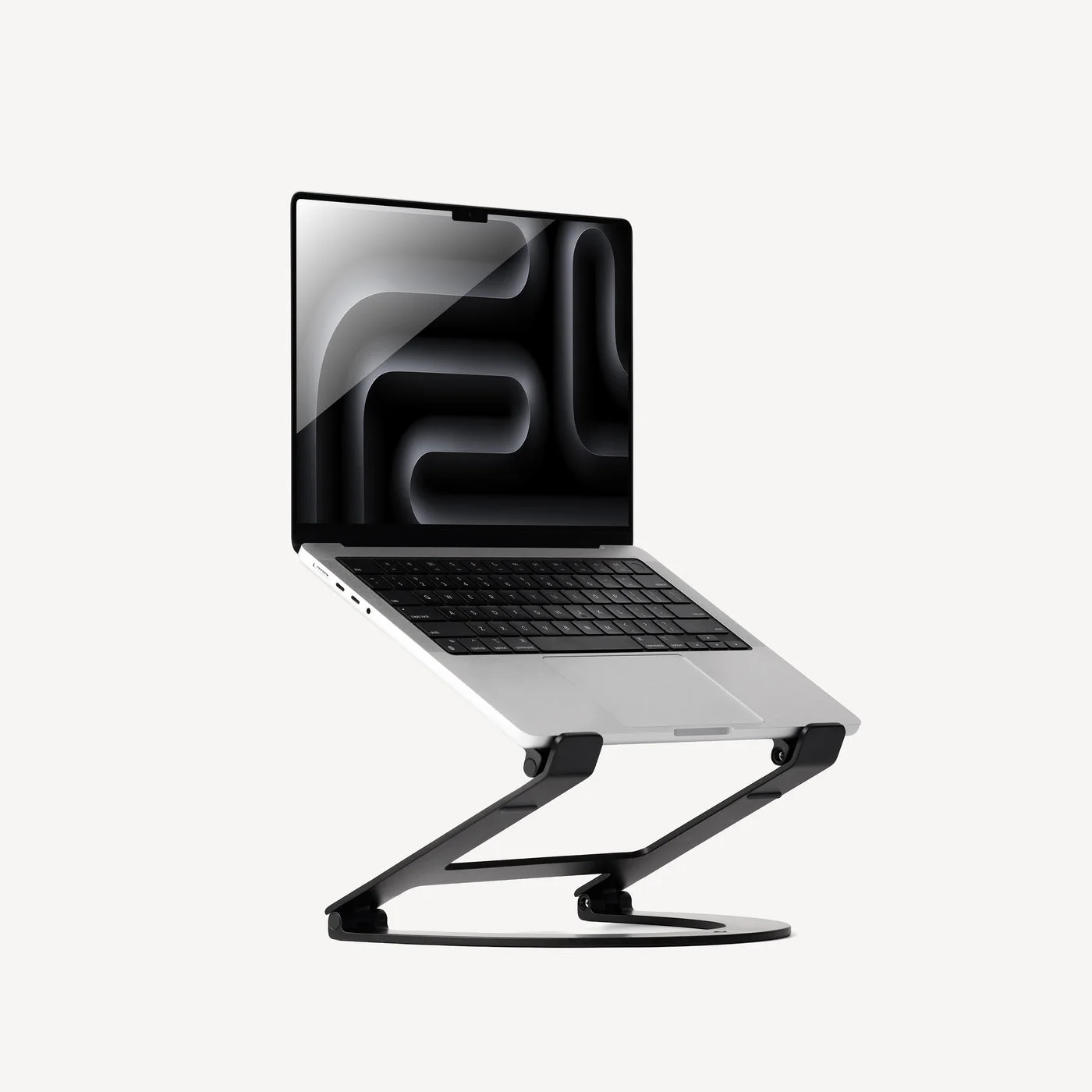
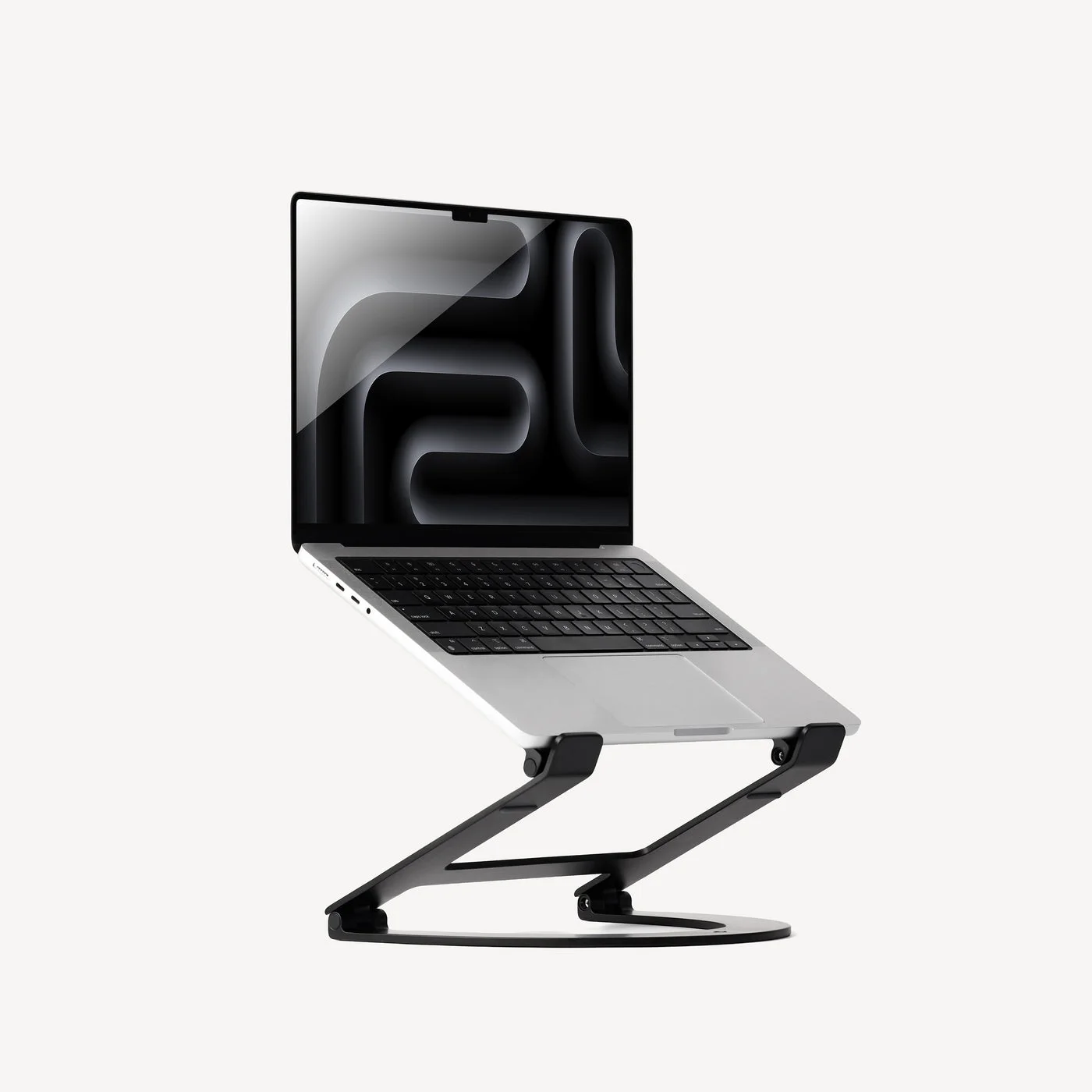
The Curve Flex is an adjustable aluminum stand. Twelve South lists a maximum unfolded height of 10.78 inches and a keyboard angle range of 0 to 45 degrees. Folded, it drops to 1.18 inches. It ships with a travel sleeve and a hinge tool.
Why choose it: it combines adjustable height, a published angle range and a folded size suited to a bag. At home, its maximum unfolded height sits well above the mStand's fixed 5.9 inches, and you can set the angle. When you leave, it folds down and goes in the included sleeve.
Trade-offs to weigh:
- Compatibility limits are explicit. Twelve South specifies laptops at least 8.66 inches wide and up to 7 lb. Check both numbers against your laptop's official specifications, not a retailer's summary.
- Read height claims carefully. Twelve South's marketing mentions a screen height of up to 22 inches. That figure is not the stand platform height. For comparing stands, use the 10.78 inch maximum unfolded height.
- More parts than a fixed stand. Adjustability means hinges you set each time, which is the price of flexibility.
Check before buying: the published fit criteria are width and weight. If your laptop meets both, read the product page for any additional notes about your model.
Roost V3: best for minimal travel weight
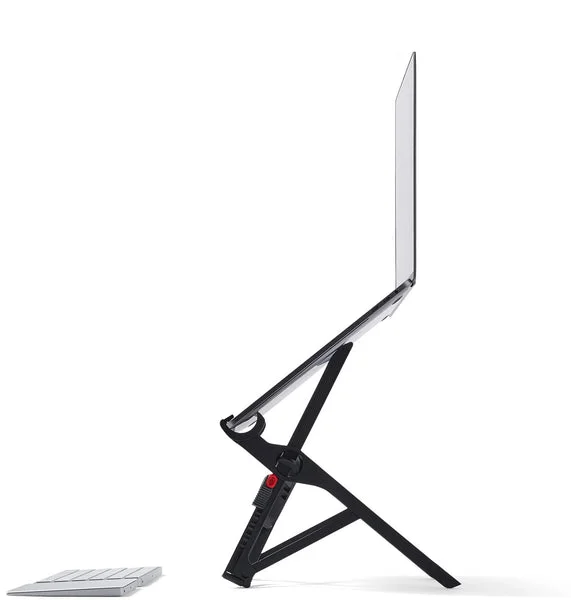
The Roost V3 has seven height settings and a published screen lift of 6.5 to 12.5 inches. Roost lists it at 178 g and gives a folded size of 1 by 1.5 by 13 inches.
Why choose it: folded, it becomes a long, narrow shape of 1 by 1.5 by 13 inches, and its listed weight is 178 g. If you work from cafes, client offices or hotel desks and already carry a full bag, those figures suit that kind of routine. If carry weight is your deciding factor, check the current listed weight of any other stand you are considering on its manufacturer's page so you are comparing like with like.
Trade-offs to weigh:
- Different measurement. Roost publishes screen lift, while the Curve Flex figure above is maximum unfolded stand height and the mStand figure is the stand's own height. These numbers are not directly comparable, so do not rank the three by height alone.
- Variant confusion. The Roost V3 Plus is a separate model with 11 height settings and a different lift range. If you see 11 settings in a listing, you are looking at the V3 Plus, and the figures in this guide do not apply to it.
- Unusual chassis shapes. We recommend verifying fit before buying if your laptop has an unusual design, such as a wedge profile, a raised hinge, ports in unexpected places or a convertible form factor.
Compatibility checklist
Run through this list with your laptop's official spec sheet open. A few minutes here can help you avoid a mismatch.
- Exact model and variant. Confirm mStand versus mStand360, and Roost V3 versus V3 Plus. Their specs differ.
- Laptop width. For the Curve Flex, it must be at least 8.66 inches. For the mStand, compare against the 10 inch listed width.
- Laptop weight. The Curve Flex is rated up to 7 lb. For other stands, check the manufacturer's page for current limits rather than assuming.
- Depth and overhang. The mStand is 7.5 inches deep. Think about how far your laptop will extend past the front and back edges.
- Port and vent placement. Look at where your ports and air vents sit. A stand that covers a side or bottom port can get in the way of a cable. We are not making cooling claims for any stand, but you should know where your laptop exhausts air before you place it on a surface.
- Chassis shape. Thin, flat laptops are the simplest case. Convertibles, gaming laptops with rear-heavy designs and unusually shaped bodies need extra checking, especially with the Roost.
- Cable routing. If you dock through a single USB-C cable, a rear opening like the mStand's can keep things tidy. See our laptops and connectivity coverage for hub and dock considerations.
- Desk depth. Raising a laptop usually means adding a keyboard and mouse in front of it. Make sure your desk has room for both.
Plan for a keyboard and mouse
This is the part of the purchase that many people skip. Once a laptop sits on a stand, its built-in keyboard and trackpad are raised and angled away from a normal typing position. In practice, a raised laptop screen works best with an external keyboard and mouse.
That changes the real cost and footprint of the setup:
- Budget for input devices if you do not already own them. Our keyboards and mice guides cover compact and travel-friendly options.
- For travel setups, the stand is only part of the kit. A folding stand plus a full-size keyboard may no longer be the lightweight package you wanted. Factor in a compact keyboard and small mouse if portability is the goal.
- Wireless or wired: wireless input keeps the desk clear, while wired avoids pairing and battery management. Either works; choose based on how often you move.
- Angle versus height: the Curve Flex's published 0 to 45 degree keyboard angle range gives you positioning options. The higher you raise the screen, the more important an external keyboard becomes.
We do not make medical or health claims about laptop stands. The practical benefit is a different screen position and a more flexible desk layout. For broader workspace planning, including monitor arms, desk mats and cable management, see our desk setup section.
How we chose these stands
We compared these three stands using the manufacturers' published specifications: dimensions, height ranges, folding size, listed weight, fit criteria and included accessories. We chose them to represent three distinct use cases: a fixed desk stand, an adjustable stand that also folds, and a light travel stand.
We did not test these stands for stability, cooling, wobble, typing feel or long-term durability, and we do not rank them against each other on those points. Prices and availability change frequently, so check the current price and stock with the seller before you buy. Our editorial policy explains how we research and present recommendations.
Bottom line: pick the mStand if your laptop stays put. Pick the Curve Flex if you want adjustable height plus a published angle range and still need to travel occasionally. Pick the Roost V3 if a low listed carry weight and a compact folded size are the deciding factors. Then confirm your laptop's width, weight and chassis shape against the exact model you are buying.
Frequently asked questions
What is the best laptop stand for a permanent desk?
For a laptop that stays on one desk, the Rain Design mStand is a strong fit. It is a single piece of aluminum with a fixed listed height of 5.9 inches and a rear cable opening, so there is nothing to adjust or fold.
Do I need an external keyboard with a laptop stand?
In most cases, yes. Raising the screen also raises the built-in keyboard and trackpad, so an external keyboard and mouse is the practical way to type and navigate with the laptop elevated.
Will the Twelve South Curve Flex fit my laptop?
Twelve South specifies laptops at least 8.66 inches wide and up to 7 lb. Check both figures against your laptop's official specifications. Note that the up to 22 inch screen height in marketing is not the stand's platform height. The stand's maximum unfolded height is 10.78 inches.
What is the difference between the Roost V3 and V3 Plus?
They are separate variants. The Roost V3 has seven height settings and a published screen lift of 6.5 to 12.5 inches. The V3 Plus has 11 settings and a different lift range, so confirm which one a listing refers to before buying.
Research-led guides for better PC setups. Read how we select and check gear.